🐳 12 Years of Docker: Shipping Projects Anywhere
Reflecting on over a decade of using Docker containers to build, ship, and run projects seamlessly across environments. Why Docker remains my favorite tool for development, deployment, and AI workflows.

🐳 Why Docker is Still My Favorite Tool
I started using Docker containers over 12 years ago, and it changed the way I build and ship software forever. Whether I'm working on web apps, AI agents, or backend services, Docker lets me package everything—code, dependencies, and environment—into a portable container that runs anywhere.
In 2020 or 2021, I had the pleasure of delivering a one-hour presentation on Docker containers to an event organized by the WordPress Developers community in Athens/Hellas. It was a fantastic experience sharing knowledge and connecting with fellow developers passionate about containerization and DevOps.
🚀 What Makes Docker Special?
- Consistency: "It works on my machine" is no longer an excuse. If it runs in a container, it runs everywhere.
- Portability: Ship your project from your laptop to the cloud, a server, or a teammate's machine with zero hassle.
- Isolation: Each project gets its own environment, so dependencies never clash.
- Speed: Build, test, and deploy faster with reproducible environments and instant rollbacks.
🧑💻 Docker for AI & Local Development
Docker isn't just for web apps. I use it to build and run AI agents locally, orchestrate multi-service workflows with Docker Compose, and experiment with new SDKs like LangGraph, CrewAI, and Spring AI—all inside containers.
- Spin up LLMs and vector databases with a single
docker-compose up - Try new AI tools from Docker Hub without polluting your system
- Share reproducible AI environments with collaborators
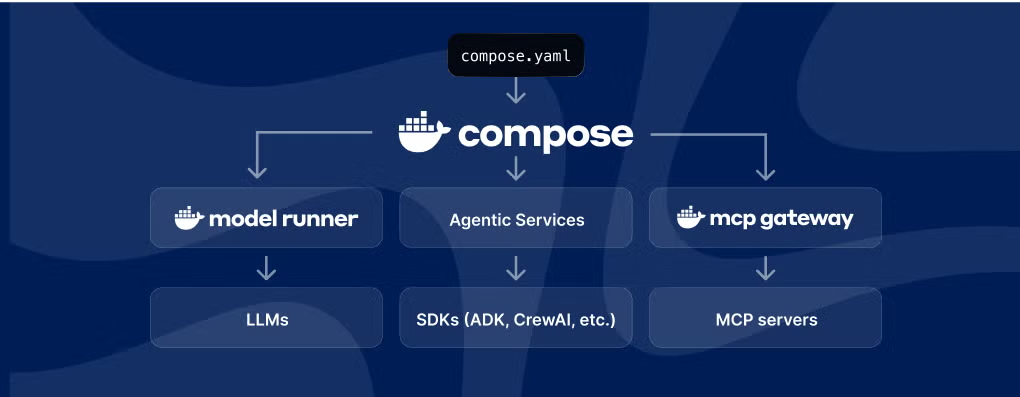
🤖 Compose. Build. Deploy. The Easiest Way to Build, Run, and Secure Agents
From prototype to production, agentic app development is easier than ever with Docker AI. With the workflow you already know, you can now power seamless development and deployment across local, cloud, and multi-cloud environments with Docker Compose.
- Docker Compose holds it all together: Build with the SDKs you know and love, run your favorite LLMs, connect to MCP servers, and deploy anywhere—local, Docker Cloud, or the cloud of your choice.
- Docker Offload: Offload to the cloud with fast GPU acceleration. Break free of local limits, natively Docker, and priced for development.
- Uniting the ecosystem: Docker is driving industry standards for building agents, integrating seamlessly with today’s most powerful tools.
🚀 New Docker Innovations for Agent Development
- Docker Offload: Access remote Docker engines and GPUs using the same Docker Desktop you already love.
- MCP Gateway: A unified control plane, consolidating multiple MCP servers into a single, consistent endpoint for your AI agents.
- Model Runner: Integrated with Compose, now runs in the cloud and supports more LLMs for smarter, smoother agentic apps.
- Hub MCP Server: Connects Docker Hub APIs to LLMs via the Model Context Protocol (MCP).
- Gordon: Docker’s AI assistant helps with containerizing apps and now includes new DevSecOps capabilities.
Docker is the place to build AI agents, with seamless integration and support for the frameworks and languages you already use. Whether you’re building with LangGraph, CrewAI, Spring AI, or your favorite SDK, Docker embraces ecosystem diversity—no new tools, just new power.
Explore popular models, orchestration tools, databases, and MCP servers in Docker Hub. Simplify AI experimentation and deployment—Docker Model Runner converts LLMs into OCI-compliant containers, making it easy to package, share, and scale AI.
Integrated gateways and security agents help teams stay compliant, auditable, and production-ready from day one. Build and test locally, deploy to Docker Offload or your cloud of choice—no infrastructure hurdles.
🔑 Key Docker Features I Love
- Docker Compose: Define and manage multi-container apps with a simple YAML file
- Docker Hub: Discover and share container images for everything from databases to AI models
- OCI Compliance: Run containers anywhere—local, cloud, or edge
💡 Tips for Getting Started
- Install Docker Desktop for your OS
- Explore Docker Hub for ready-to-use images
- Start with
docker run hello-worldto test your setup - Use
docker-compose.ymlto manage multi-service projects
🌍 Final Thoughts
After more than a decade, Docker is still my go-to tool for shipping projects anywhere. If you haven't tried it yet, give it a spin—you might never go back!
Share this post
Help others discover this content by sharing it on your favorite social networks!
Subscribe to my Newsletter
Stay informed with the latest updates and insights.
We'll never share your email with anyone else.
admin
Senior Fullstack Developer
Thank you for reading my blog post! If you found it valuable, please consider sharing it with your network. Want to discuss your project or need web development help? Book a consultation with me, or maybe even buy me a coffee ☕️ with the links below. Your support goes well beyond a coffee drink. Its a motivator to keep writing and creating useful content.
Related Posts
All essays →- Oct 15, 2026
Free AI from NVIDIA: a practical guide to build.nvidia.com
- Oct 9, 2026
Nominated as Business Innovator: a letter I opened standing up
- Oct 8, 2026
Mistral Large 4: Europe finally has a frontier model of its own
- Jan 25, 2026
Nvidia's AI Empire: How Jensen Huang Built the Future of Computing