Free AI from NVIDIA: a practical guide to build.nvidia.com
NVIDIA lets you try dozens of top open models for free, including Kimi K3, DeepSeek V4 Pro and Nemotron, plus agent skills, blueprints and self-hostable NIM containers. Here's what's free, how to start in five minutes, and the catches to know.

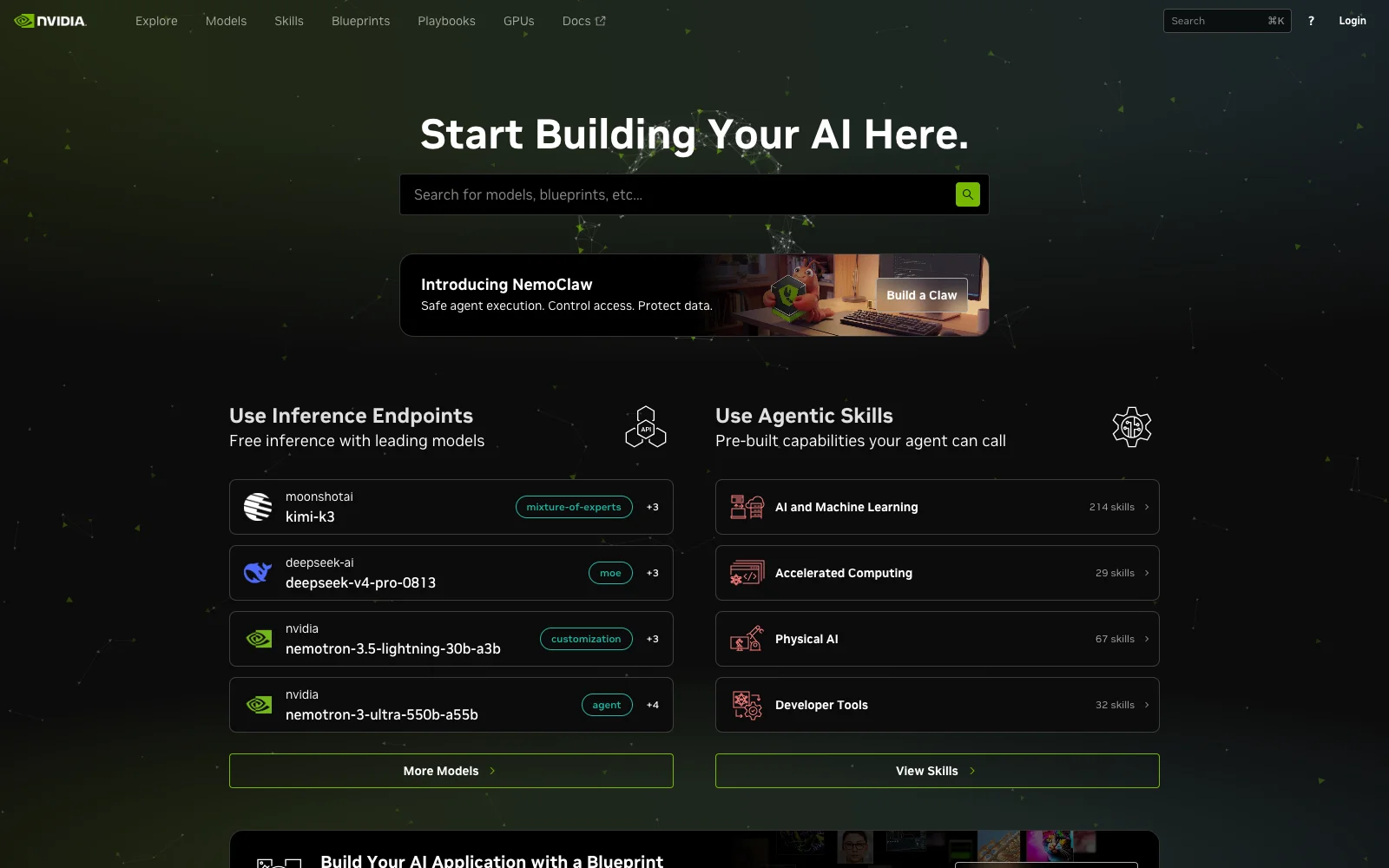
Every week someone asks me: “Which AI model should I use, and how much will it cost me to find out?” Here's an answer that's easy to miss: NVIDIA lets you try dozens of the best open models for free, through build.nvidia.com. Kimi K3, DeepSeek V4 Pro, NVIDIA's own Nemotron and many more, behind a single API key.
It's not obvious from the homepage what's free, what isn't, and where the catches are. So here's my practical guide.
What you get for free
- Free inference endpoints. Out of 97 models in the catalogue, 38 currently have a free hosted endpoint. Among them: Kimi K3, DeepSeek V4 Pro, and Nemotron 3 Ultra with a 1M-token context. There are also vision, speech, retrieval and even biology models, not just chat.
- Downloadable models you can self-host. 82 models come as NIM containers. As a member of the free NVIDIA Developer Program you can run them on your own GPUs, on up to 16 GPUs, for research, development and testing.
- 398 agent skills. Ready-made capabilities your AI agent can call, from RAG to GPU data processing, published on GitHub.
- 33 blueprints. Reference applications with code: a RAG pipeline, a deep-research agent, a CUDA coding assistant and more. Great for learning how the pieces fit.
- Playbooks. Step-by-step guides for running AI on your own machine, from an RTX workstation to DGX Spark and DGX Station.
Get started in five minutes
- Sign in at build.nvidia.com. Signing in enrols you in the NVIDIA Developer Program, which is free.
- Pick a model on the Models page. Use the Free Endpoint filter, so you only see what you can call at no cost.
- Play first. Every model has a Playground tab. Test your real prompts there before you write a line of code.
- Generate an API key on the model page. It starts with
nvapi-. Store it as an environment variable, never in your code or a public repository. - Call it. The API is OpenAI-compatible, so the code you already have works with a new base URL:
pip install openai
export NVIDIA_API_KEY="nvapi-..."
from openai import OpenAI
import os
client = OpenAI(
base_url="https://integrate.api.nvidia.com/v1",
api_key=os.environ["NVIDIA_API_KEY"],
)
reply = client.chat.completions.create(
model="nvidia/nemotron-3-ultra-550b-a55b",
messages=[{"role": "user", "content": "Explain RAG in three sentences."}],
max_tokens=512,
)
print(reply.choices[0].message.content)Because it speaks the OpenAI format, you can also plug it into most tools that let you set a custom OpenAI base URL: LangChain, LlamaIndex, Open WebUI and many coding assistants. Change the base URL and the model name, keep everything else.
The catches, honestly
- It's for prototyping, not production. NVIDIA's own FAQ says Developer Program access is for prototyping, research, development and testing only. Production use needs an NVIDIA AI Enterprise licence, and there's a 90-day trial for that.
- Rate limits are real. NVIDIA doesn't publish a fixed number and says limits depend on the model and current traffic. Developers commonly report around 40 requests per minute, and there's no way to raise it on the free tier. Fine for testing, not for an app with users.
- Mind your data. This is the one I want everyone to read. On the free trial, NVIDIA records your inputs and outputs, also to improve its products, and asks you not to upload confidential information or personal data. So no customer lists, no patient notes, no contracts. For real client data, self-host the model, or use a European provider; I wrote about that in my Mistral Large 4 post.
- Not everything is free. The partner endpoints (OpenRouter, Together AI and others) and the GPUs on Brev are paid. The free ones are clearly labelled.
How I'd use it
- Choose a model before you pay for one. Run the same ten real prompts through three or four free models and compare. It's the cheapest model evaluation you'll ever do.
- Prototype the whole app. Build your chatbot, RAG search or agent against the free endpoint. When it works, switch the base URL to a paid or self-hosted endpoint. Nothing else changes.
- Learn from the blueprints. Even if you never deploy them, reading how NVIDIA wires a RAG pipeline teaches you a lot.
- Plan your exit. Know from day one where production will run: a self-hosted NIM, a paid endpoint, or a European provider when personal data is involved.
Links
Everything below opens in a new tab:
- build.nvidia.com: sign in and start.
- The model catalogue: filter by “Free Endpoint”.
- Agent skills, blueprints and playbooks.
- API documentation and the NIM FAQ, with the official terms.
Stuck somewhere, or not sure whether this fits your project? Send me a message. I'm happy to help you choose.
Share this post
Help others discover this content by sharing it on your favorite social networks!
Subscribe to my Newsletter
Stay informed with the latest updates and insights.
We'll never share your email with anyone else.
admin
Senior Fullstack Developer
Thank you for reading my blog post! If you found it valuable, please consider sharing it with your network. Want to discuss your project or need web development help? Book a consultation with me, or maybe even buy me a coffee ☕️ with the links below. Your support goes well beyond a coffee drink. Its a motivator to keep writing and creating useful content.
Related Posts
All essays →- Oct 9, 2026
Nominated as Business Innovator: a letter I opened standing up
- Oct 8, 2026
Mistral Large 4: Europe finally has a frontier model of its own
- Jan 25, 2026
Nvidia's AI Empire: How Jensen Huang Built the Future of Computing
- Nov 12, 2025
Kimi K2 Thinking: Open‑Source Reasoning Hits the Frontier